It can feel tough when you’re trying to make a sale. You have great items, but getting them listed and priced just right takes time. Many people wonder if there’s a simpler way. There truly is! Using the right scanner app can change how you resell. It helps you work faster and smarter.
Scanner apps are a game-changer for resellers. They help you quickly identify items, get pricing information, and list them for sale. This saves you a lot of time and can lead to more profits.
What Is a Scanner App for Reselling?
A scanner app is a tool for your phone. It uses your phone’s camera to read barcodes. Think of it like a barcode scanner you see at a store. But this one is for your reselling business. It can look up product details and prices online. This helps you know what an item is worth.
It also helps you check if a product is selling well. The app connects to online marketplaces. It can search sites like eBay, Amazon, or Poshmark. You can see what similar items sold for. This is super important for setting a good price.
Why Using Scanner Apps Matters for Resellers
Reselling can be a lot of work. You find items. You clean them. You take photos. Then you write descriptions and list them. That’s a lot of steps! Scanner apps help with some of the hardest parts.
They make finding product information quick. You don’t have to type in long names. Just scan the barcode. The app shows you what it found. This saves you time on every single item. More time means you can list more things. Listing more things means more chances to sell.
This is key for making money. If you sell often, you learn more. You see what sells and what doesn’t. Scanner apps give you data fast. This data helps you pick better items to sell. It also helps you price them so they sell.
My First Time Using a Scanner App
I remember walking through a thrift store a few years ago. I had a big pile of clothes and home goods. I was trying to decide what to buy. It felt like guessing most of the time. I’d pick things up and look for brand names. I’d try to remember if I’d seen them online. It took forever.
My friend saw me struggling. She pulled out her phone and opened an app. She scanned a simple t-shirt. Bam! It showed me the brand, the style name, and that it had sold on eBay for $25. I was amazed. She explained how the app worked. It searched sold listings.
That day changed how I resold. I bought a scanner app. My first few trips felt like a new world. I wasn’t just guessing anymore. I was making smart choices. I could scan a book and know its value instantly. I scanned a toy and saw it was a rare one. It felt like I had a secret superpower.
How Scanner Apps Work: The Tech Behind It
Most scanner apps use your phone’s camera. They are smart enough to read the lines and numbers of a barcode. This is called optical character recognition or OCR. The app finds the barcode in the photo. It reads the numbers.
Then, the app sends those numbers to a database. This database has information about millions of products. It’s like a giant online library for items. The database looks up the barcode number. It pulls up details like the product name, manufacturer, and sometimes even a picture.
For reselling, the best apps go further. They search online marketplaces. They look for items with the same barcode. They check recent sales. This is called “comps” or comparable sales data. You see what other people paid. This is the most valuable part for a reseller.
Choosing the Right Scanner App for Your Needs
Not all scanner apps are the same. Some are better for books. Some are better for general merchandise. Some focus on specific platforms like eBay. Here are things to think about.
Features to Look For
Barcode Scanning: This is the basic need. The app must scan barcodes quickly and accurately.
Marketplace Integration: Does it search eBay, Amazon, Poshmark, Mercari, or others? The more sites it checks, the better your data.
Sold Listing Data: This is critical. You need to see what items actually sold for, not just what people are asking.
Pricing Guidance: Some apps offer suggested prices based on sales.
Inventory Management: Does it help you keep track of what you have?
Ease of Use: Is the app simple to navigate?
Cost: Many good apps have a monthly fee or one-time purchase.
Popular Scanner Apps for Resellers
Here are a few apps that many resellers trust. Each has its strengths.
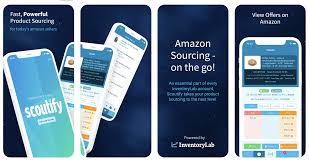
Scoutify 2 (for eBay): This app is very popular for eBay sellers. It scans barcodes and searches eBay quickly. It shows you sold listings, profit estimates, and more. It’s a subscription app.
Poshmark App (for Poshmark): While not a dedicated scanner, Poshmark’s search function is strong. You can often search by brand and item type to find similar sold items. Many resellers use the Poshmark app to scout.
The Sell.app: This is another strong contender. It connects to multiple platforms. It offers advanced analytics and helps with listing. It’s good for serious sellers.
Springa: This app focuses on speed. It’s designed for quick scanning in stores. It pulls data from various sources to help you make fast decisions.
Neat Scanner: This is more for digitizing documents and receipts. But some people use its scanning features for item details. It might not have the direct sales data needed for reselling.
I started with a free app, but soon moved to a paid one. The paid apps gave me much better data. They helped me make more money quickly. The subscription fee paid for itself in no time.
How to Use a Scanner App Effectively
Using these apps is pretty straightforward. But there are tips to get the most out of them.
In the Store (Sourcing Items)
1. Open the App: Have it ready before you even start looking.
2. Find an Item: See something that looks promising?
3. Locate the Barcode: It’s usually on the item itself, or its packaging. Sometimes you have to look carefully.
4. Scan It: Hold your phone steady. The app should find and read the barcode.
5. Review the Data: Look at the price, brand, and especially the sold listings.
6. Make a Decision: Is it a good buy? Does it fit your selling niche?
At Home (Listing Items)
1. Scan to Import: You can scan items you already have. This can help you list them faster.
2. Check Current Prices: See what the item is selling for now. Prices can change.
3. Update Listings: If you find better pricing data, update your old listings.
What I learned early on is to focus on items that have clear barcodes. Sometimes things like handmade items or very old collectibles won’t have them. For those, you need other research methods. But for most mass-produced goods, scanners are gold.
Quick Scan Checklist
- Item Type: Is it something you know sells?
- Barcode: Is it present and readable?
- Sold Data: Are there recent sales?
- Profit: Can you make money after fees?
- Condition: Does the item match sold items?
Scanning Books for Reselling
Books are a huge part of the reselling world. They are often small and easy to ship. But their value can vary a lot. Scanner apps are perfect for books.
You can scan the ISBN number on the back cover. The app will then show you what that specific edition sold for. This is important. A book with the same title but a different ISBN can be worth much less.
I once found a stack of old textbooks. They looked like they were worth nothing. I scanned one, and it showed it sold for over $100! It was a specific edition that professors still used. Without the scanner, I would have missed it.
When scanning books, look for:
Specific editions (ISBN is key!)
Hardcover vs. softcover
Condition (ex-library books are usually worth less)
Niche or academic subjects
Book Scanning Tips
Make sure the ISBN is clear. Sometimes it’s faded.
Check multiple sources if possible. Some apps pull from different book databases.
Consider textbooks. They often have high resale value.
Scanning Toys and Collectibles
Toys and collectibles are another big area. Many of these items have barcodes. But sometimes the value comes from being a specific series, version, or being in the box.
Action Figures: Look for specific characters or limited editions.
Board Games: Some vintage games are very collectible.
Video Games: Old consoles and games can be valuable.
Trading Cards: While not always barcoded, some sets might be.
For toys, even if there’s a barcode, you might need to do extra research. Search the brand and item name. Look for keywords like “vintage,” “rare,” or the character’s name. The scanner app can give you a starting point. It tells you if any version of that item is selling.
Scanning Clothing and Accessories
Clothing is trickier for barcode scanners. Most clothing items don’t have barcodes that link to specific sales data. You might find a brand barcode, but it won’t tell you how much that specific shirt sold for.
However, some apps are starting to help with this. They can sometimes identify brands and styles. You might scan a designer label, and it tells you the brand’s general popularity or if similar items sell well.
For clothing, you’ll often rely more on:
Brand recognition
Item condition
Style and material
Searching manually on platforms like Poshmark and eBay
Accessories like handbags, jewelry, or watches might have more identifiable product codes or serial numbers. Some apps can look these up.
When Barcodes Aren’t Enough
Scenario: You find a cool vintage band t-shirt.
Challenge: No barcode to scan.
Solution:
- Look for the brand and size tags.
- Search the band name and “t-shirt vintage” on eBay or Google.
- Look for similar sold items.
- Check for any holes, stains, or fading.
Scanning Electronics and Home Goods
Electronics often have barcodes. Scanners can be very useful here. You can quickly see if a TV remote, a small appliance, or a computer part is selling online.
Model Numbers: These are often key. Scan the barcode or type in the model number.
Condition: For electronics, testing them is vital. A scanner tells you price, but not if it works.
Power Cords/Accessories: Make sure these are included. They affect value.
Home goods can be varied. Think kitchen gadgets, decor, and linens. If they have a barcode, scan it. If not, you’ll need to rely on brand names and descriptive searches.
What I found with electronics is that even if a listing shows sold prices, you must test the item. A broken remote is worth very little. But a working one could be worth $20-$30.
Understanding Pricing Data from Scanner Apps
Seeing prices is one thing. Knowing what they mean is another. Scanner apps show you sales data. This data is your guide.
Average Sale Price: This is the typical price an item sells for.
Low and High Sales: Some items sell for a lot more or less. You need to see why. Was one in perfect condition? Was another missing parts?
Date of Sale: Recent sales are more important. Prices can change over time. An item sold last year might be worth less today.
Platform Data: Data from eBay might differ from Amazon or Poshmark. Understand where the data comes from.
I always look for the average price. Then I check the range. If I have an item in great condition, I aim for the higher end of the range. If it has flaws, I aim for the lower end or price it to sell quickly.
Calculating Potential Profit
The best scanner apps help you estimate profit. They factor in:
Your purchase price
Platform selling fees (eBay takes a cut, Poshmark takes a cut)
Shipping costs (or the cost to you if you offer free shipping)
This is so important. You can’t just look at the sold price. You need to know how much you will make.
For example, an item sells for $20.
You bought it for $2.
eBay fees are $3.
Shipping is $5.
Your profit is $20 – $2 – $3 – $5 = $10.
Some apps do this math for you. It saves a lot of time. It also helps you avoid losing money.
Profit Calculation Example
Item Found Price: $5
App Shows Sold Price: $30
Platform Fees (estimate): $4 (e.g., 13% of $30)
Estimated Shipping Cost: $7
Your Estimated Profit: $30 – $5 – $4 – $7 = $14
Decision: This looks like a good buy!
When Scanner Apps Might Not Be the Best Tool
While amazing, scanner apps aren’t perfect for every situation.
No Barcode: As mentioned, handmade items, vintage clothing, or unique art often lack barcodes.
Niche Items: If you sell very specific, rare items, the app’s database might not have enough data.
New Products: If a product is brand new and hasn’t sold much yet, there won’t be comps.
Platform Specificity: An app that scans eBay comps might not be useful if you primarily sell on Mercari.
Market Fluctuations: Sometimes, prices change very quickly, and the data might lag slightly.
In these cases, you’ll need to rely on manual research. Look at current listings, ask in online reseller groups, or use your own experience.
Scanning for Different Reselling Platforms
Each selling platform has its own market. What sells well on eBay might not on Poshmark.
eBay: Great for a wide variety of items. Scanner apps that pull eBay data are very useful. Look for electronics, collectibles, rare items, and vintage goods.
Poshmark: Focuses on fashion. While scanners can help identify brands, manual searching by style, size, and condition is often more important here. Designer clothing and accessories do well.
Mercari: Similar to eBay but often with lower fees and a more casual feel. Many types of items sell here.
Amazon: Primarily for new or like-new items, especially in categories like books, electronics, and home goods. Barcodes are essential here.
It’s smart to use apps that can search across multiple platforms if you sell on more than one. This gives you a broader picture of an item’s value.
My Biggest Scanner App Surprise
I was at a small flea market. It was a hot, dusty day. I was tired and ready to pack it in. I saw a dusty box of old computer parts. Nothing looked like it would be worth much. I almost walked away. But I decided to scan one odd-looking chip with my app.
It was an old graphics card. The app pulled up eBay. It showed that specific, rare card had sold for $150! I couldn’t believe it. I bought the whole box for $10. I sold the card that night for $130 after fees. The rest of the box had other small parts that sold too.
That one scan saved my whole day and made me a good profit. It taught me to scan almost everything, even if it doesn’t look like much. You never know what hidden gem might be in that box.
App-Assisted Sourcing Myth vs. Reality
Myth: Scanner apps do all the work for you.
Reality: Apps provide data, but you need to interpret it. You still need to know item condition, your costs, and market trends.
Myth: All items with barcodes are valuable.
Reality: Many items have barcodes but little resale value. The scanner data shows you what has sold.
Tips for Scanning Consistently
To make scanner apps a true part of your workflow, try these tips:
1. Keep Your App Updated: Developers often improve their apps. Updates can mean faster scanning or better data.
2. Know Your Phone’s Camera: Ensure your camera is clean. Blurry photos mean the app can’t read the barcode.
3. Scan in Good Light: Bright, even light helps the app see the barcode clearly. Avoid harsh shadows.
4. Practice Scanning: The more you do it, the faster you’ll get. Learn to hold your phone at the right distance.
5. Don’t Rely Only on Scanners: Use them as a tool, but always use your own judgment too. If an item seems like a bad deal even with good comps, pass on it.
6. Track Your Purchases: Keep a note of what you paid for scanned items. This helps with profit calculations later.
When to Worry: Scanner App Data and Condition
It’s easy to get excited by high sold prices. But you must be realistic.
Item Condition: A scanner might show an item sold for $50. But if your item is scratched, dirty, or broken, it’s worth much less. Always assess the condition honestly.
Completeness: Are all the parts there? Missing pieces can drastically lower value.
Authenticity: Be sure you aren’t scanning a counterfeit item. Scanners rely on barcode data. They don’t check for fakes. If you’re unsure, do more research.
Market Saturation: If you scan an item and see hundreds of similar ones listed, the price might drop. High supply can lower demand.
I once saw a popular toy sell for $30. I had one, but it was missing the box. I scanned it, and the app still showed $30. But when I looked at the actual sold listings, they were all for items with the box. My item was worth maybe $5. That’s a big lesson learned.
Quick Checks Before You Buy
- Is it clean?
- Are all parts there?
- Does it look like sold examples?
- Is it a known brand?
The Future of Reselling and Scanner Apps
Scanner apps are only getting smarter. We’ll likely see more AI integration. This means better analysis of item condition from photos. More apps will connect to even more selling platforms.
The reselling market is growing. Tools that help resellers work efficiently will become even more important. If you’re not using a scanner app yet, now is the time to start. It’s one of the simplest ways to boost your reselling game.
It helps you buy smarter, price better, and sell faster. It takes the guesswork out of finding valuable items.
Frequently Asked Questions About Scanner Apps for Reselling
What is the best scanner app for reselling on eBay?
Many eBay sellers love Scoutify 2. It’s designed specifically for eBay and pulls sold listing data quickly. Other apps like The Sell.app or Springa can also work well, depending on your needs.
Are there free scanner apps for resellers?
Yes, there are some free options, but they often have limited features or data. Paid apps usually offer more robust databases, real-time comps, and profit calculators. The investment in a paid app often pays for itself quickly through better purchasing decisions.
Can scanner apps read any barcode?
Most scanner apps can read standard UPC and EAN barcodes. They can also often read ISBNs for books. Some advanced apps might use image recognition for product details even without a barcode, but this is less common.
How do scanner apps help me make more money?
They help you make more money by showing you what items have sold for recently. This means you can avoid overpaying for items and price your own items competitively. They save you time, allowing you to list and sell more products.
Do I need a special phone for scanner apps?
No, most modern smartphones (both iPhone and Android) with a decent camera can run scanner apps. The performance will depend on your phone’s processing power and camera quality.
What if an item doesn’t have a barcode?
If an item lacks a barcode, you’ll need to rely on manual research. Use the brand name, model number, or descriptive keywords to search directly on reselling platforms like eBay, Poshmark, or Mercari. Look at current and sold listings to gauge value.
How often should I update my scanner app?
It’s a good idea to keep your scanner app updated to the latest version. Developers regularly release updates to improve scanning speed, accuracy, database information, and add new features. Check your app store for updates regularly.
Final Thoughts on Using Scanner Apps
Using a scanner app is one of the best ways to level up your reselling business. It turns guesswork into informed decisions. You can find profitable items faster. You can price them better. And you can spend less time researching and more time selling.
It’s like having an expert guide with you as you source. Don’t let the tech scare you. Most apps are very user-friendly. Start with one that fits your budget and selling niche. You’ll be surprised at how quickly it becomes an essential tool.